BIOS (Basic Input Output System)
BIOS adalah singkatan dari Basic Input Output System. merupakan suatu software (ditulis dalam bahasa assembly) yang mengatur fungsi dasar dari perangkat keras (hardware) komputer. BIOS tertanam dalam sebuah chip memory (ROM ataupun Flash Memory berbahan Comlpimentari Metal Oxide Semiconductor (CMOS) yang terdapat pada motherboard. Sebuah baterai yang biasa disebut sebagai baterai CMOS berfungsi untuk menjaga agar tanggal dan settingan lainnya yang telah kita set pada BIOS tidak hilang atau kembali ke konfigurasi awal meskipun komputer dimatikan.
Fungsi utama BIOS
Fungsi utama BIOS adalah untuk memberikan instruksi yang dikenal dengan istilah POST (Power On Selft Test) yaitu perintah untuk menginisialisasi dan identifikasi perangkat sistem seperti CPU, RAM, VGA Card, Keyboard dan Mouse, Hardisk drive, Optical (CD/DVD) drive dan hardware lainnya pada saat komputer mulai booting.
Cara Kerja BIOS
Cara kerja BIOS adalah dimulai dengan proses inisialisasi, dimana dalam proses ini kita bisa melihat jumlah memory yang terinstall, jenis hardisk dan kapasitasnya dan sebagainya. BIOS kemudian akan mencari, menginisialisasi dan menampilkan informasi dari Graphics Card. Kemudian akan mengecek device ROM lain seperti hardisk dan kemudian melakukan pengetesan RAM yaitu memory count up test. Setelah semua test komponen berhasil dilakukan, BIOS kemudian akan mencari lokasi booting device dan Sistem Operasi.
MENU-MENU PENGATURAN PADA BIOS
Cara Akses BIOS
Untuk mengakses BIOS dapat kita lakukan dengan menekan tombol tertentu (biasanya tombol Delete atau F2) pada Keyboard pada saat pertama kali komputer dinyalakan. Akan terdapat tulisan misalnya "Pres F2 to enter setup", maka langsung saja tekan tombol F2 berulang-ulang.
Cara seting atau konfigurasi BIOS ini berbeda-beda tergantung dari vendor pembuatnya, disini saya akan menampilkan menu-menu pada BIOS yang umum kita temui yaitu Phoenix Award BIOS. Menu utama pada BIOS ini adalah :
1. Standard CMOS Features, untuk seting tanggal dan melihat hardisk yang terdeteksi, dll.
2. Advanced BIOS Features, pengaturan boot device priority (pilihan device untuk pertama booting) dapat diset disini.
3. Advanced Chipset Features
4. Integrated Peripherals
5. Power Management Setup, pembagian tegangan untuk masing-masing periferal dimana ini sering digunakan untuk overclocking
6. PnP/PCI Configuration, mengkonfigurasi clock/kecepatan dari setiap perangakat yang terpasang pada port PCI/PnP,misal vga pci ,lancard pci, wirelles port pci, HDMI,dll
7. PC Health Status, kita bisa cek temperatur dan tegangan dari Power Suplly disini.
8. Load Fail-Safe Defaults (Load Factory Setting), pilih menu ini untuk mengembalikan seluruh setingan ke mode asalnya (default).
9. Load Optimized Defaults, mengembalikan settingan optimal yang direkomendasikan oleh bawaan pabrik.
10. Set Supervisor Password, memberi kata sandi agar tidak sembarangan user mampu mengubah-ubah settingan BIOS
11. Set User Password,
12. Save & Exit Setup, menyimpan settingan BIOS lalu keluar.
13. Exit Without Saving , keluar dari layar bios tanpa menyimpan settingan.
KESIMPULAN :
BIOS (Basic Input Output System) merupakan hal yang sangat vital yang dapat membantu kita saat hendak melakukan troubleshooting pada kerusakan komputer. Seperti misalnya :
a. Kasus komputer mati total ternyata bisa diatasi dengan cara mereset BIOS komputer,
b. saat hendak melakukan istallasi windows pengaturan first boot harus diatur terlebih dahulu disini.
c. Melihat spesifikasi perkakas komputer
d. bahkan saat mengoptimalkan kinerja komputer yang lebih dikenal dengan overclocking.
http://kumpulanmateripenting.blogspot.com/2013/04/pengertian-bios-dan-fungsinya.html

Selasa, 07 April 2015

Cara Menggunakan JOOMLA (JOOMLAの使用方法)
CARA MEMBUAT WEBSITE MENGGUNAKAN APLIKASI JOOMLA
Cara install Joomla 3.3 di localhost (XAMPP). Untuk menginstall Joomla di localhost terlebih dahulu Anda harus menginstall web server dan MySQL di komputer Anda menggunakan aplikasi XAMPP. Buat Anda yang belum tahu bagaimana cara menginstall XAMPP silahkan baca disini.
Untuk langkah-langkah cara menginstall Joomla 3.3 sebagai berikut :
- Download aplikasi joomla 3.3 ( versi terbaru)
- Setelah itu download aplikasi XAMPP lalu Start APACHE dan MYSQL
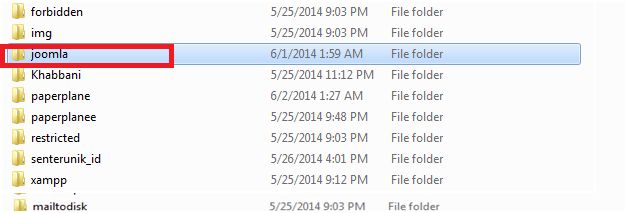
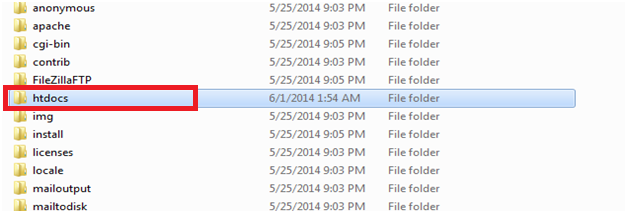
- Buka xampp/localhost/htdocs/ buat folder baru beri nama joomla ( biasanya terletak pada drive c : setelah install xammp
- Hasil ekstrakan joomla 3.3
- Buka dan Copy hasil Ekstrakan joomla 3.3
- Sehabis di copy paste kan ke folder yang tadi anda buat di localhost/htdocs/nama folder yang anda buat tadi
- Buka web browser lalu ketikkan URL localhost/XAMMP dan pilih php myadmin
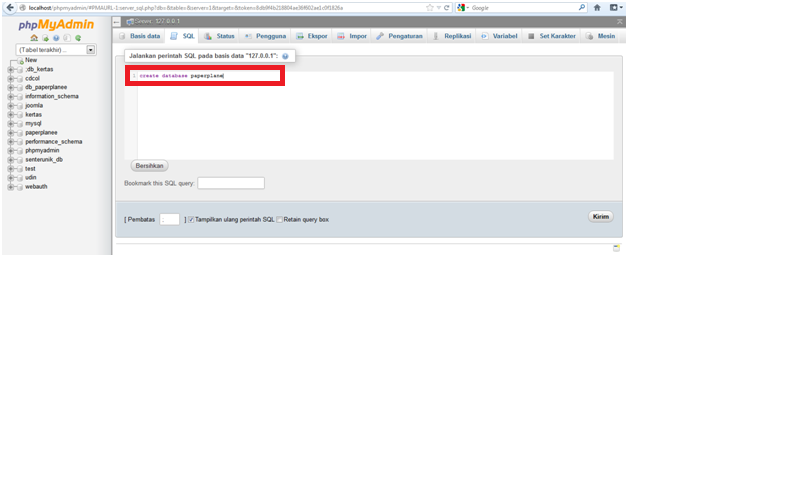
- Setelah pilih dan klik php myAdmin lalu pilih SQL dan buat database sesuai keinginan anda
- Kemudian ketikan command pada kolom SQL sebagai contoh “ create database (sesuai keinginan anda)”
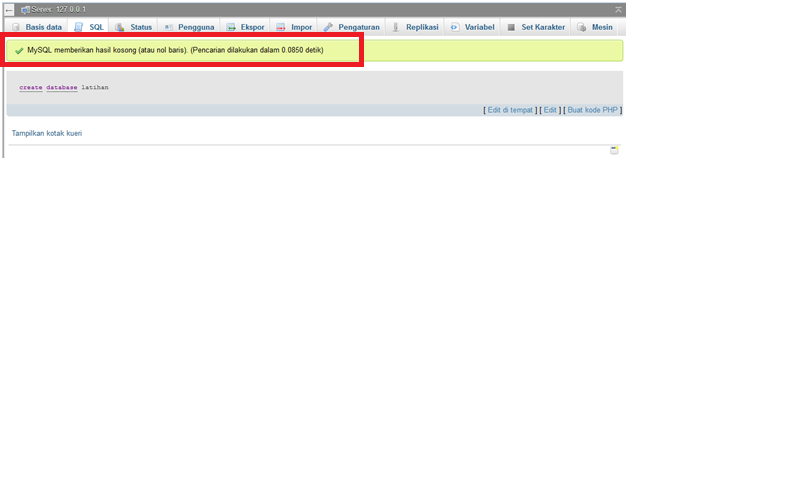
- Lalu pilih kirim dan sampai perintah berikut
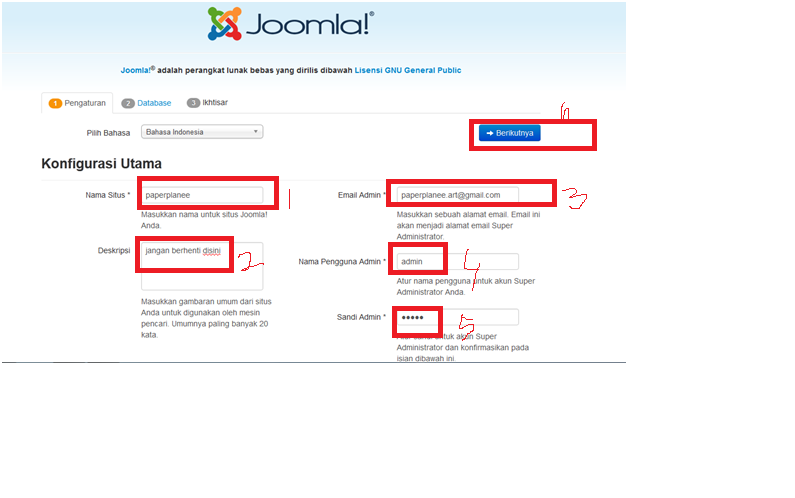
- Setelah itu ketikan pada URL mozila/opera mini localhost/joomla kemudian akan tampil gambar di bawah ini dan isi kan command yang ada di gambar
- Setelah diisi semua pilih Berikutnya
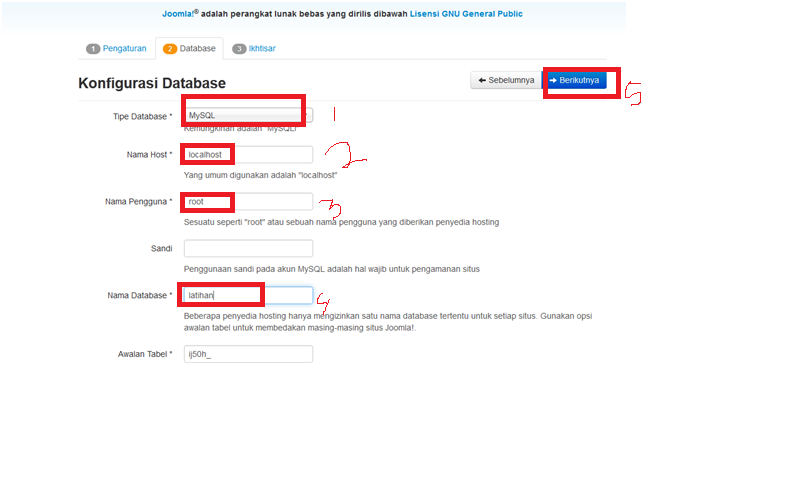
- Kemudian isikan kembali command-command,jika sudah di isi commandnya pilih berikutnya
- Kemudian akan tampil gambar di bawah ini dan pilih berikutnya
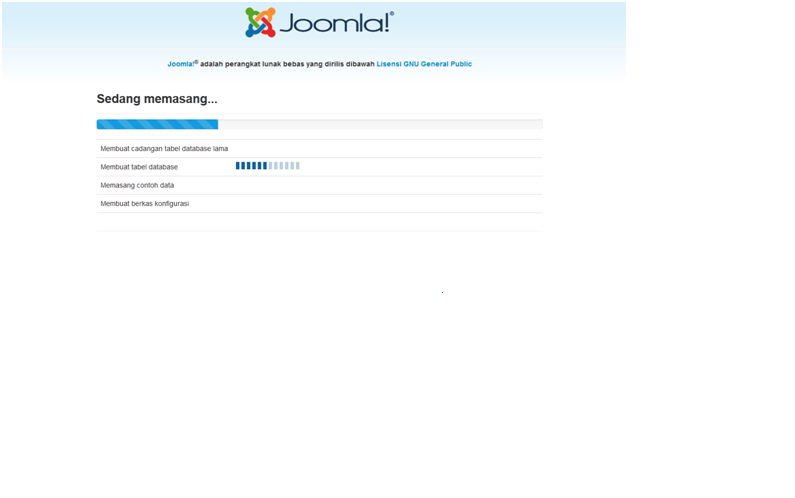
- Sehabis itu tunggu tahap instalasing selesai
- Setelah selesai klik hapus direktori pemasangan dan klik administrasi
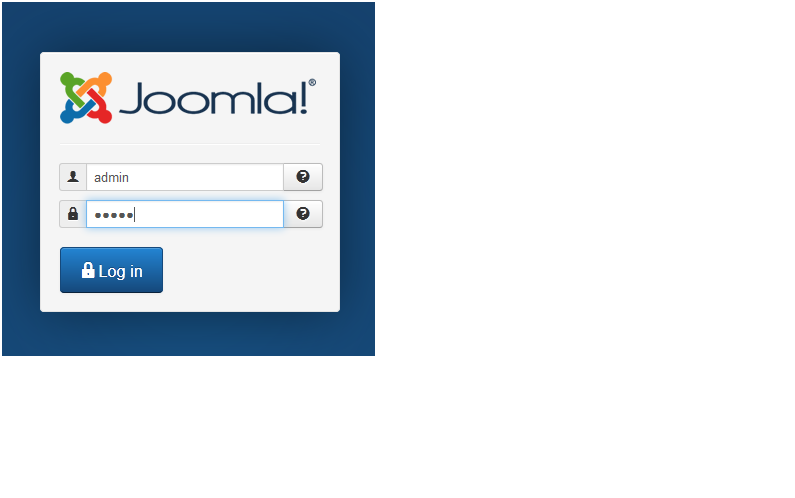
- Maka akan tampil tampilan seperti di gambar bawah ini dan masukan nama admin yang anda buat tadi serta sandinya dan kllik LOG IN
- Dan gambar dibawah ini tampilan website administrasi joomla yang anda buat






Jika kamu ingin meliahat tampilan website kamu, kamu klik di bagian atas pojok kanan

sekian artikel ini saya buat
semoga bermanfaat untuk teman-teman…
jangan lupa tinggalkan komentar…..
saran dan kritik teman-teman sangat membantu untuk perkembangan artikel kami selanjutnya
Kumpulan Efek Blog & macam macam kode Javascript (エフェクトコレクションブログ&その他のJavascriptコード)
Kumpulan Efek - Efek Blog ( Lengkap )
Kumpulan Efek - Efek Blog ( Lengkap ) - Memang selalu ada cara untuk mempercantik penampilan blog. Setelah sebelum memposting cara memasang animasi di blog, kali ini saya akan kasih sobat berbagai macam / jenis efek - efek blog yang bisa di pasang di blog.
Sebelum kita masuk ke intinya, terlebih dahulu saya ingatkan pada sobat bahwa efek, animasi dan widget - widget serupa akan menambah beban loading blog sobat, jadi mohon di perhitungkan sebelum sobat memasang efek ini. Efek yang akan saya posting kali ini, akan saya bagi 2 yaitu efek ringan ( loading ringan ) dan efek menegah hingga berat. ( kayak tinju aja.. ) .
Sobat yang tertarik memasangnya silahkan ikuti tutorial memasang efek - efek pada blogberikut.
A. Efek Ringan
Mungkin Ini adalah efek yang biasa sobat lihat saat sobat blogwalking.
1. Efek salju berjatuhan
2. Efek hati bertaburan
3. Efek bintang bertaburan
4. Efek kembang api
5. Efek Gelembung
5. Efek Kupu - Kupu Terbang
Cara pemasangan :
B. Efek Menengah - Berat
Efek ini saya ambil dari http://www.netdisaster.com. Untuk demo dari salah satu script berikut, silahkan lihat di sini.. DEMO
1.Meteor Jatuh
2. Banjir
3. Bunga Mekar
4. Bom Atom
5. Ufo
6. Graffity
7. Shaver
8. Gun
9.Bloody gun
10. Paint ball
11. Chainsaw
12. Dinosaur
13. Lebah
14. Lalat
15. Semut
16. Siput
17. Cacing
18. Mold
19. Bayi merangkak
20. Telur mata sapi
21. Kopi tumpah
22. Terbakar
23. Tomat
24. Creampie
25. Murka
26. Sapi Jorok
27. Anjing Jorok
28. Kencing Sembarangan
Cara pemasangan :
Efek yang ke 2 berbeda dengan efek yang pertama. di efek ke 2, efek bisa dimatikan secara manual, sedangkan yang pertama sebaliknya ( tidak bisa dimatikan selama masih memasang scriptnya ). so, pilih mana yang terbaik menurut sobat.. salam..
Sebelum kita masuk ke intinya, terlebih dahulu saya ingatkan pada sobat bahwa efek, animasi dan widget - widget serupa akan menambah beban loading blog sobat, jadi mohon di perhitungkan sebelum sobat memasang efek ini. Efek yang akan saya posting kali ini, akan saya bagi 2 yaitu efek ringan ( loading ringan ) dan efek menegah hingga berat. ( kayak tinju aja.. ) .
Sobat yang tertarik memasangnya silahkan ikuti tutorial memasang efek - efek pada blogberikut.
A. Efek Ringan
Mungkin Ini adalah efek yang biasa sobat lihat saat sobat blogwalking.
1. Efek salju berjatuhan
<script src='http://tateluproject.googlecode.com/files/snow.js' type='text/javascript'></script>
2. Efek hati bertaburan
<script src='http://tateluproject.googlecode.com/files/lovingheart.js' type='text/javascript'></script>
3. Efek bintang bertaburan
<script src='http://tateluproject.googlecode.com/files/bintang.js' type='text/javascript'></script>
4. Efek kembang api
<script src='http://tateluproject.googlecode.com/files/kembangapi.js' type='text/javascript'></script>
5. Efek Gelembung
<script src='http://tateluproject.googlecode.com/files/efek-gelembung.js' type='text/javascript'></script>
5. Efek Kupu - Kupu Terbang
<script language="JavaScript1.2" src="http://imtikhan.googlecode.com/files/Kupu-kupu1.js"></script>
Cara pemasangan :
- Klik rancangan --> Edit html
- Letakkan script efek di atas kode </body>
- Klik Save
B. Efek Menengah - Berat
Efek ini saya ambil dari http://www.netdisaster.com. Untuk demo dari salah satu script berikut, silahkan lihat di sini.. DEMO
1.Meteor Jatuh
<script language="javascript">
nd_mode="meteor";
nd_control="on";
nd_sound="on";
nd_vAlign="bottom";
nd_hAlign="right";
nd_vMargin="10";
nd_hMargin="10";
nd_target="_blank";
</script>
<script language="javascript" src="http://tateluproject.googlecode.com/files/efek.js"></script>
<div style="position: fixed; bottom: 0px; right: 20px;width:100px;height:30px;"><small><center><a href="http://christiantatelu.blogspot.com/2012/03/kumpulan-efek-efek-blog-lengkap.html" target="_blank">Efek Blog</a></center></small></div>
nd_mode="meteor";
nd_control="on";
nd_sound="on";
nd_vAlign="bottom";
nd_hAlign="right";
nd_vMargin="10";
nd_hMargin="10";
nd_target="_blank";
</script>
<script language="javascript" src="http://tateluproject.googlecode.com/files/efek.js"></script>
<div style="position: fixed; bottom: 0px; right: 20px;width:100px;height:30px;"><small><center><a href="http://christiantatelu.blogspot.com/2012/03/kumpulan-efek-efek-blog-lengkap.html" target="_blank">Efek Blog</a></center></small></div>
2. Banjir
<script language="javascript">
nd_mode="flood";
nd_vAlign="bottom";
nd_hAlign="right";
nd_vMargin="10";
nd_hMargin="10";
nd_target="_blank";
</script>
<script language="javascript" src="http://tateluproject.googlecode.com/files/efek.js"></script>
<div style="position: fixed; bottom: 0px; right: 20px;width:100px;height:30px;"><small><center><a href="http://christiantatelu.blogspot.com/2012/03/kumpulan-efek-efek-blog-lengkap.html" target="_blank">Efek Blog</a></center></small></div>
nd_mode="flood";
nd_vAlign="bottom";
nd_hAlign="right";
nd_vMargin="10";
nd_hMargin="10";
nd_target="_blank";
</script>
<script language="javascript" src="http://tateluproject.googlecode.com/files/efek.js"></script>
<div style="position: fixed; bottom: 0px; right: 20px;width:100px;height:30px;"><small><center><a href="http://christiantatelu.blogspot.com/2012/03/kumpulan-efek-efek-blog-lengkap.html" target="_blank">Efek Blog</a></center></small></div>
3. Bunga Mekar
<script language="javascript">
nd_mode="flowers";
nd_vAlign="bottom";
nd_hAlign="right";
nd_vMargin="10";
nd_hMargin="10";
nd_target="_blank";
</script>
<script language="javascript" src="http://tateluproject.googlecode.com/files/efek.js"></script>
<div style="position: fixed; bottom: 0px; right: 20px;width:100px;height:30px;"><small><center><a href="http://christiantatelu.blogspot.com/2012/03/kumpulan-efek-efek-blog-lengkap.html" target="_blank">Efek Blog</a></center></small></div>
nd_mode="flowers";
nd_vAlign="bottom";
nd_hAlign="right";
nd_vMargin="10";
nd_hMargin="10";
nd_target="_blank";
</script>
<script language="javascript" src="http://tateluproject.googlecode.com/files/efek.js"></script>
<div style="position: fixed; bottom: 0px; right: 20px;width:100px;height:30px;"><small><center><a href="http://christiantatelu.blogspot.com/2012/03/kumpulan-efek-efek-blog-lengkap.html" target="_blank">Efek Blog</a></center></small></div>
4. Bom Atom
<script language="javascript">
nd_mode="bomb";
nd_sound="on";
nd_vAlign="bottom";
nd_hAlign="right";
nd_vMargin="10";
nd_hMargin="10";
nd_target="_blank";
</script>
<script language="javascript" src="http://tateluproject.googlecode.com/files/efek.js"></script>
<div style="position: fixed; bottom: 0px; right: 20px;width:100px;height:30px;"><small><center><a href="http://christiantatelu.blogspot.com/2012/03/kumpulan-efek-efek-blog-lengkap.html" target="_blank">Efek Blog</a></center></small></div>
nd_mode="bomb";
nd_sound="on";
nd_vAlign="bottom";
nd_hAlign="right";
nd_vMargin="10";
nd_hMargin="10";
nd_target="_blank";
</script>
<script language="javascript" src="http://tateluproject.googlecode.com/files/efek.js"></script>
<div style="position: fixed; bottom: 0px; right: 20px;width:100px;height:30px;"><small><center><a href="http://christiantatelu.blogspot.com/2012/03/kumpulan-efek-efek-blog-lengkap.html" target="_blank">Efek Blog</a></center></small></div>
5. Ufo
<script language="javascript">
nd_mode="ufo";
nd_sound="on";
nd_vAlign="bottom";
nd_hAlign="right";
nd_vMargin="10";
nd_hMargin="10";
nd_target="_blank";
</script>
<script language="javascript" src="http://tateluproject.googlecode.com/files/efek.js"></script>
<div style="position: fixed; bottom: 0px; right: 20px;width:100px;height:30px;"><small><center><a href="http://christiantatelu.blogspot.com/2012/03/kumpulan-efek-efek-blog-lengkap.html" target="_blank">Efek Blog</a></center></small></div>
nd_mode="ufo";
nd_sound="on";
nd_vAlign="bottom";
nd_hAlign="right";
nd_vMargin="10";
nd_hMargin="10";
nd_target="_blank";
</script>
<script language="javascript" src="http://tateluproject.googlecode.com/files/efek.js"></script>
<div style="position: fixed; bottom: 0px; right: 20px;width:100px;height:30px;"><small><center><a href="http://christiantatelu.blogspot.com/2012/03/kumpulan-efek-efek-blog-lengkap.html" target="_blank">Efek Blog</a></center></small></div>
6. Graffity
<script language="javascript">
nd_mode="graff";
nd_vAlign="bottom";
nd_hAlign="right";
nd_vMargin="10";
nd_hMargin="10";
nd_target="_blank";
</script>
<script language="javascript" src="http://tateluproject.googlecode.com/files/efek.js"></script>
<div style="position: fixed; bottom: 0px; right: 20px;width:100px;height:30px;"><small><center><a href="http://christiantatelu.blogspot.com/2012/03/kumpulan-efek-efek-blog-lengkap.html" target="_blank">Efek Blog</a></center></small></div>
nd_mode="graff";
nd_vAlign="bottom";
nd_hAlign="right";
nd_vMargin="10";
nd_hMargin="10";
nd_target="_blank";
</script>
<script language="javascript" src="http://tateluproject.googlecode.com/files/efek.js"></script>
<div style="position: fixed; bottom: 0px; right: 20px;width:100px;height:30px;"><small><center><a href="http://christiantatelu.blogspot.com/2012/03/kumpulan-efek-efek-blog-lengkap.html" target="_blank">Efek Blog</a></center></small></div>
7. Shaver
<script language="javascript">
nd_mode="shaver";
nd_vAlign="bottom";
nd_hAlign="right";
nd_vMargin="10";
nd_hMargin="10";
nd_target="_blank";
</script>
<script language="javascript" src="http://tateluproject.googlecode.com/files/efek.js"></script>
<div style="position: fixed; bottom: 0px; right: 20px;width:100px;height:30px;"><small><center><a href="http://christiantatelu.blogspot.com/2012/03/kumpulan-efek-efek-blog-lengkap.html" target="_blank">Efek Blog</a></center></small></div>
nd_mode="shaver";
nd_vAlign="bottom";
nd_hAlign="right";
nd_vMargin="10";
nd_hMargin="10";
nd_target="_blank";
</script>
<script language="javascript" src="http://tateluproject.googlecode.com/files/efek.js"></script>
<div style="position: fixed; bottom: 0px; right: 20px;width:100px;height:30px;"><small><center><a href="http://christiantatelu.blogspot.com/2012/03/kumpulan-efek-efek-blog-lengkap.html" target="_blank">Efek Blog</a></center></small></div>
8. Gun
<script language="javascript">
nd_mode="gun";
nd_sound="on";
nd_vAlign="bottom";
nd_hAlign="right";
nd_vMargin="10";
nd_hMargin="10";
nd_target="_blank";
</script>
<script language="javascript" src="http://tateluproject.googlecode.com/files/efek.js"></script>
<div style="position: fixed; bottom: 0px; right: 20px;width:100px;height:30px;"><small><center><a href="http://christiantatelu.blogspot.com/2012/03/kumpulan-efek-efek-blog-lengkap.html" target="_blank">Efek Blog</a></center></small></div>
nd_mode="gun";
nd_sound="on";
nd_vAlign="bottom";
nd_hAlign="right";
nd_vMargin="10";
nd_hMargin="10";
nd_target="_blank";
</script>
<script language="javascript" src="http://tateluproject.googlecode.com/files/efek.js"></script>
<div style="position: fixed; bottom: 0px; right: 20px;width:100px;height:30px;"><small><center><a href="http://christiantatelu.blogspot.com/2012/03/kumpulan-efek-efek-blog-lengkap.html" target="_blank">Efek Blog</a></center></small></div>
9.Bloody gun
<script language="javascript">
nd_mode="blood";
nd_vAlign="bottom";
nd_hAlign="right";
nd_vMargin="10";
nd_hMargin="10";
nd_target="_blank";
</script>
<script language="javascript" src="http://tateluproject.googlecode.com/files/efek.js"></script>
<div style="position: fixed; bottom: 0px; right: 20px;width:100px;height:30px;"><small><center><a href="http://christiantatelu.blogspot.com/2012/03/kumpulan-efek-efek-blog-lengkap.html" target="_blank">Efek Blog</a></center></small></div>
nd_mode="blood";
nd_vAlign="bottom";
nd_hAlign="right";
nd_vMargin="10";
nd_hMargin="10";
nd_target="_blank";
</script>
<script language="javascript" src="http://tateluproject.googlecode.com/files/efek.js"></script>
<div style="position: fixed; bottom: 0px; right: 20px;width:100px;height:30px;"><small><center><a href="http://christiantatelu.blogspot.com/2012/03/kumpulan-efek-efek-blog-lengkap.html" target="_blank">Efek Blog</a></center></small></div>
10. Paint ball
<script language="javascript">
nd_mode="paint";
nd_vAlign="bottom";
nd_hAlign="right";
nd_vMargin="10";
nd_hMargin="10";
nd_target="_blank";
</script>
<script language="javascript" src="http://tateluproject.googlecode.com/files/efek.js"></script>
<div style="position: fixed; bottom: 0px; right: 20px;width:100px;height:30px;"><small><center><a href="http://christiantatelu.blogspot.com/2012/03/kumpulan-efek-efek-blog-lengkap.html" target="_blank">Efek Blog</a></center></small></div>
nd_mode="paint";
nd_vAlign="bottom";
nd_hAlign="right";
nd_vMargin="10";
nd_hMargin="10";
nd_target="_blank";
</script>
<script language="javascript" src="http://tateluproject.googlecode.com/files/efek.js"></script>
<div style="position: fixed; bottom: 0px; right: 20px;width:100px;height:30px;"><small><center><a href="http://christiantatelu.blogspot.com/2012/03/kumpulan-efek-efek-blog-lengkap.html" target="_blank">Efek Blog</a></center></small></div>
11. Chainsaw
<script language="javascript">
nd_mode="chainsaw";
nd_vAlign="bottom";
nd_hAlign="right";
nd_vMargin="10";
nd_hMargin="10";
nd_target="_blank";
</script>
<script language="javascript" src="http://tateluproject.googlecode.com/files/efek.js"></script>
<div style="position: fixed; bottom: 0px; right: 20px;width:100px;height:30px;"><small><center><a href="http://christiantatelu.blogspot.com/2012/03/kumpulan-efek-efek-blog-lengkap.html" target="_blank">Efek Blog</a></center></small></div>
nd_mode="chainsaw";
nd_vAlign="bottom";
nd_hAlign="right";
nd_vMargin="10";
nd_hMargin="10";
nd_target="_blank";
</script>
<script language="javascript" src="http://tateluproject.googlecode.com/files/efek.js"></script>
<div style="position: fixed; bottom: 0px; right: 20px;width:100px;height:30px;"><small><center><a href="http://christiantatelu.blogspot.com/2012/03/kumpulan-efek-efek-blog-lengkap.html" target="_blank">Efek Blog</a></center></small></div>
12. Dinosaur
<script language="javascript">
nd_mode="dino";
nd_vAlign="bottom";
nd_hAlign="right";
nd_vMargin="10";
nd_hMargin="10";
nd_target="_blank";
</script>
<script language="javascript" src="http://tateluproject.googlecode.com/files/efek.js"></script>
<div style="position: fixed; bottom: 0px; right: 20px;width:100px;height:30px;"><small><center><a href="http://christiantatelu.blogspot.com/2012/03/kumpulan-efek-efek-blog-lengkap.html" target="_blank">Efek Blog</a></center></small></div>
nd_mode="dino";
nd_vAlign="bottom";
nd_hAlign="right";
nd_vMargin="10";
nd_hMargin="10";
nd_target="_blank";
</script>
<script language="javascript" src="http://tateluproject.googlecode.com/files/efek.js"></script>
<div style="position: fixed; bottom: 0px; right: 20px;width:100px;height:30px;"><small><center><a href="http://christiantatelu.blogspot.com/2012/03/kumpulan-efek-efek-blog-lengkap.html" target="_blank">Efek Blog</a></center></small></div>
13. Lebah
<script language="javascript">
nd_mode="wasp";
nd_vAlign="bottom";
nd_hAlign="right";
nd_vMargin="10";
nd_hMargin="10";
nd_target="_blank";
</script>
<script language="javascript" src="http://tateluproject.googlecode.com/files/efek.js"></script>
<div style="position: fixed; bottom: 0px; right: 20px;width:100px;height:30px;"><small><center><a href="http://christiantatelu.blogspot.com/2012/03/kumpulan-efek-efek-blog-lengkap.html" target="_blank">Efek Blog</a></center></small></div>
nd_mode="wasp";
nd_vAlign="bottom";
nd_hAlign="right";
nd_vMargin="10";
nd_hMargin="10";
nd_target="_blank";
</script>
<script language="javascript" src="http://tateluproject.googlecode.com/files/efek.js"></script>
<div style="position: fixed; bottom: 0px; right: 20px;width:100px;height:30px;"><small><center><a href="http://christiantatelu.blogspot.com/2012/03/kumpulan-efek-efek-blog-lengkap.html" target="_blank">Efek Blog</a></center></small></div>
14. Lalat
<script language="javascript">
nd_mode="fly";
nd_vAlign="bottom";
nd_hAlign="right";
nd_vMargin="10";
nd_hMargin="10";
nd_target="_blank";
</script>
<script language="javascript" src="http://tateluproject.googlecode.com/files/efek.js"></script>
<div style="position: fixed; bottom: 0px; right: 20px;width:100px;height:30px;"><small><center><a href="http://christiantatelu.blogspot.com/2012/03/kumpulan-efek-efek-blog-lengkap.html" target="_blank">Efek Blog</a></center></small></div>
nd_mode="fly";
nd_vAlign="bottom";
nd_hAlign="right";
nd_vMargin="10";
nd_hMargin="10";
nd_target="_blank";
</script>
<script language="javascript" src="http://tateluproject.googlecode.com/files/efek.js"></script>
<div style="position: fixed; bottom: 0px; right: 20px;width:100px;height:30px;"><small><center><a href="http://christiantatelu.blogspot.com/2012/03/kumpulan-efek-efek-blog-lengkap.html" target="_blank">Efek Blog</a></center></small></div>
15. Semut
<script language="javascript">
nd_mode="ants";
nd_vAlign="bottom";
nd_hAlign="right";
nd_vMargin="10";
nd_hMargin="10";
nd_target="_blank";
</script>
<script language="javascript" src="http://tateluproject.googlecode.com/files/efek.js"></script>
<div style="position: fixed; bottom: 0px; right: 20px;width:100px;height:30px;"><small><center><a href="http://christiantatelu.blogspot.com/2012/03/kumpulan-efek-efek-blog-lengkap.html" target="_blank">Efek Blog</a></center></small></div>
nd_mode="ants";
nd_vAlign="bottom";
nd_hAlign="right";
nd_vMargin="10";
nd_hMargin="10";
nd_target="_blank";
</script>
<script language="javascript" src="http://tateluproject.googlecode.com/files/efek.js"></script>
<div style="position: fixed; bottom: 0px; right: 20px;width:100px;height:30px;"><small><center><a href="http://christiantatelu.blogspot.com/2012/03/kumpulan-efek-efek-blog-lengkap.html" target="_blank">Efek Blog</a></center></small></div>
16. Siput
<script language="javascript">
nd_mode="snail";
nd_vAlign="bottom";
nd_hAlign="right";
nd_vMargin="10";
nd_hMargin="10";
nd_target="_blank";
</script>
<script language="javascript" src="http://tateluproject.googlecode.com/files/efek.js"></script>
<div style="position: fixed; bottom: 0px; right: 20px;width:100px;height:30px;"><small><center><a href="http://christiantatelu.blogspot.com/2012/03/kumpulan-efek-efek-blog-lengkap.html" target="_blank">Efek Blog</a></center></small></div>
nd_mode="snail";
nd_vAlign="bottom";
nd_hAlign="right";
nd_vMargin="10";
nd_hMargin="10";
nd_target="_blank";
</script>
<script language="javascript" src="http://tateluproject.googlecode.com/files/efek.js"></script>
<div style="position: fixed; bottom: 0px; right: 20px;width:100px;height:30px;"><small><center><a href="http://christiantatelu.blogspot.com/2012/03/kumpulan-efek-efek-blog-lengkap.html" target="_blank">Efek Blog</a></center></small></div>
17. Cacing
<script language="javascript">
nd_mode="worms";
nd_vAlign="bottom";
nd_hAlign="right";
nd_vMargin="10";
nd_hMargin="10";
nd_target="_blank";
</script>
<script language="javascript" src="http://tateluproject.googlecode.com/files/efek.js"></script>
<div style="position: fixed; bottom: 0px; right: 20px;width:100px;height:30px;"><small><center><a href="http://christiantatelu.blogspot.com/2012/03/kumpulan-efek-efek-blog-lengkap.html" target="_blank">Efek Blog</a></center></small></div>
nd_mode="worms";
nd_vAlign="bottom";
nd_hAlign="right";
nd_vMargin="10";
nd_hMargin="10";
nd_target="_blank";
</script>
<script language="javascript" src="http://tateluproject.googlecode.com/files/efek.js"></script>
<div style="position: fixed; bottom: 0px; right: 20px;width:100px;height:30px;"><small><center><a href="http://christiantatelu.blogspot.com/2012/03/kumpulan-efek-efek-blog-lengkap.html" target="_blank">Efek Blog</a></center></small></div>
18. Mold
<script language="javascript">
nd_mode="mold";
nd_vAlign="bottom";
nd_hAlign="right";
nd_vMargin="10";
nd_hMargin="10";
nd_target="_blank";
</script>
<script language="javascript" src="http://tateluproject.googlecode.com/files/efek.js"></script>
<div style="position: fixed; bottom: 0px; right: 20px;width:100px;height:30px;"><small><center><a href="http://christiantatelu.blogspot.com/2012/03/kumpulan-efek-efek-blog-lengkap.html" target="_blank">Efek Blog</a></center></small></div>
nd_mode="mold";
nd_vAlign="bottom";
nd_hAlign="right";
nd_vMargin="10";
nd_hMargin="10";
nd_target="_blank";
</script>
<script language="javascript" src="http://tateluproject.googlecode.com/files/efek.js"></script>
<div style="position: fixed; bottom: 0px; right: 20px;width:100px;height:30px;"><small><center><a href="http://christiantatelu.blogspot.com/2012/03/kumpulan-efek-efek-blog-lengkap.html" target="_blank">Efek Blog</a></center></small></div>
19. Bayi merangkak
<script language="javascript">
nd_mode="baby";
nd_vAlign="bottom";
nd_hAlign="right";
nd_vMargin="10";
nd_hMargin="10";
nd_target="_blank";
</script>
<script language="javascript" src="http://tateluproject.googlecode.com/files/efek.js"></script>
<div style="position: fixed; bottom: 0px; right: 20px;width:100px;height:30px;"><small><center><a href="http://christiantatelu.blogspot.com/2012/03/kumpulan-efek-efek-blog-lengkap.html" target="_blank">Efek Blog</a></center></small></div>
nd_mode="baby";
nd_vAlign="bottom";
nd_hAlign="right";
nd_vMargin="10";
nd_hMargin="10";
nd_target="_blank";
</script>
<script language="javascript" src="http://tateluproject.googlecode.com/files/efek.js"></script>
<div style="position: fixed; bottom: 0px; right: 20px;width:100px;height:30px;"><small><center><a href="http://christiantatelu.blogspot.com/2012/03/kumpulan-efek-efek-blog-lengkap.html" target="_blank">Efek Blog</a></center></small></div>
20. Telur mata sapi
<script language="javascript">
nd_mode="eggs";
nd_vAlign="bottom";
nd_hAlign="right";
nd_vMargin="10";
nd_hMargin="10";
nd_target="_blank";
</script>
<script language="javascript" src="http://tateluproject.googlecode.com/files/efek.js"></script>
<div style="position: fixed; bottom: 0px; right: 20px;width:100px;height:30px;"><small><center><a href="http://christiantatelu.blogspot.com/2012/03/kumpulan-efek-efek-blog-lengkap.html" target="_blank">Efek Blog</a></center></small></div>
nd_mode="eggs";
nd_vAlign="bottom";
nd_hAlign="right";
nd_vMargin="10";
nd_hMargin="10";
nd_target="_blank";
</script>
<script language="javascript" src="http://tateluproject.googlecode.com/files/efek.js"></script>
<div style="position: fixed; bottom: 0px; right: 20px;width:100px;height:30px;"><small><center><a href="http://christiantatelu.blogspot.com/2012/03/kumpulan-efek-efek-blog-lengkap.html" target="_blank">Efek Blog</a></center></small></div>
21. Kopi tumpah
<script language="javascript">
nd_mode="coffee";
nd_vAlign="bottom";
nd_hAlign="right";
nd_vMargin="10";
nd_hMargin="10";
nd_target="_blank";
</script>
<script language="javascript" src="http://tateluproject.googlecode.com/files/efek.js"></script>
<div style="position: fixed; bottom: 0px; right: 20px;width:100px;height:30px;"><small><center><a href="http://christiantatelu.blogspot.com/2012/03/kumpulan-efek-efek-blog-lengkap.html" target="_blank">Efek Blog</a></center></small></div>
nd_mode="coffee";
nd_vAlign="bottom";
nd_hAlign="right";
nd_vMargin="10";
nd_hMargin="10";
nd_target="_blank";
</script>
<script language="javascript" src="http://tateluproject.googlecode.com/files/efek.js"></script>
<div style="position: fixed; bottom: 0px; right: 20px;width:100px;height:30px;"><small><center><a href="http://christiantatelu.blogspot.com/2012/03/kumpulan-efek-efek-blog-lengkap.html" target="_blank">Efek Blog</a></center></small></div>
22. Terbakar
<script language="javascript">
nd_mode="burn";
nd_vAlign="bottom";
nd_hAlign="right";
nd_vMargin="10";
nd_hMargin="10";
nd_target="_blank";
</script>
<script language="javascript" src="http://tateluproject.googlecode.com/files/efek.js"></script>
<div style="position: fixed; bottom: 0px; right: 20px;width:100px;height:30px;"><small><center><a href="http://christiantatelu.blogspot.com/2012/03/kumpulan-efek-efek-blog-lengkap.html" target="_blank">Efek Blog</a></center></small></div>
nd_mode="burn";
nd_vAlign="bottom";
nd_hAlign="right";
nd_vMargin="10";
nd_hMargin="10";
nd_target="_blank";
</script>
<script language="javascript" src="http://tateluproject.googlecode.com/files/efek.js"></script>
<div style="position: fixed; bottom: 0px; right: 20px;width:100px;height:30px;"><small><center><a href="http://christiantatelu.blogspot.com/2012/03/kumpulan-efek-efek-blog-lengkap.html" target="_blank">Efek Blog</a></center></small></div>
23. Tomat
<script language="javascript">
nd_mode="tomato";
nd_vAlign="bottom";
nd_hAlign="right";
nd_vMargin="10";
nd_hMargin="10";
nd_target="_blank";
</script>
<script language="javascript" src="http://tateluproject.googlecode.com/files/efek.js"></script>
<div style="position: fixed; bottom: 0px; right: 20px;width:100px;height:30px;"><small><center><a href="http://christiantatelu.blogspot.com/2012/03/kumpulan-efek-efek-blog-lengkap.html" target="_blank">Efek Blog</a></center></small></div>
nd_mode="tomato";
nd_vAlign="bottom";
nd_hAlign="right";
nd_vMargin="10";
nd_hMargin="10";
nd_target="_blank";
</script>
<script language="javascript" src="http://tateluproject.googlecode.com/files/efek.js"></script>
<div style="position: fixed; bottom: 0px; right: 20px;width:100px;height:30px;"><small><center><a href="http://christiantatelu.blogspot.com/2012/03/kumpulan-efek-efek-blog-lengkap.html" target="_blank">Efek Blog</a></center></small></div>
24. Creampie
<script language="javascript">
nd_mode="creampie";
nd_vAlign="bottom";
nd_hAlign="right";
nd_vMargin="10";
nd_hMargin="10";
nd_target="_blank";
</script>
<script language="javascript" src="http://tateluproject.googlecode.com/files/efek.js"></script>
<div style="position: fixed; bottom: 0px; right: 20px;width:100px;height:30px;"><small><center><a href="http://christiantatelu.blogspot.com/2012/03/kumpulan-efek-efek-blog-lengkap.html" target="_blank">Efek Blog</a></center></small></div>
nd_mode="creampie";
nd_vAlign="bottom";
nd_hAlign="right";
nd_vMargin="10";
nd_hMargin="10";
nd_target="_blank";
</script>
<script language="javascript" src="http://tateluproject.googlecode.com/files/efek.js"></script>
<div style="position: fixed; bottom: 0px; right: 20px;width:100px;height:30px;"><small><center><a href="http://christiantatelu.blogspot.com/2012/03/kumpulan-efek-efek-blog-lengkap.html" target="_blank">Efek Blog</a></center></small></div>
25. Murka
<script language="javascript">
nd_mode="god";
nd_vAlign="bottom";
nd_hAlign="right";
nd_vMargin="10";
nd_hMargin="10";
nd_target="_blank";
</script>
<script language="javascript" src="http://tateluproject.googlecode.com/files/efek.js"></script>
<div style="position: fixed; bottom: 0px; right: 20px;width:100px;height:30px;"><small><center><a href="http://christiantatelu.blogspot.com/2012/03/kumpulan-efek-efek-blog-lengkap.html" target="_blank">Efek Blog</a></center></small></div>
nd_mode="god";
nd_vAlign="bottom";
nd_hAlign="right";
nd_vMargin="10";
nd_hMargin="10";
nd_target="_blank";
</script>
<script language="javascript" src="http://tateluproject.googlecode.com/files/efek.js"></script>
<div style="position: fixed; bottom: 0px; right: 20px;width:100px;height:30px;"><small><center><a href="http://christiantatelu.blogspot.com/2012/03/kumpulan-efek-efek-blog-lengkap.html" target="_blank">Efek Blog</a></center></small></div>
26. Sapi Jorok
<script language="javascript">
nd_mode="cow";
nd_vAlign="bottom";
nd_hAlign="right";
nd_vMargin="10";
nd_hMargin="10";
nd_target="_blank";
</script>
<script language="javascript" src="http://tateluproject.googlecode.com/files/efek.js"></script>
<div style="position: fixed; bottom: 0px; right: 20px;width:100px;height:30px;"><small><center><a href="http://christiantatelu.blogspot.com/2012/03/kumpulan-efek-efek-blog-lengkap.html" target="_blank">Efek Blog</a></center></small></div>
nd_mode="cow";
nd_vAlign="bottom";
nd_hAlign="right";
nd_vMargin="10";
nd_hMargin="10";
nd_target="_blank";
</script>
<script language="javascript" src="http://tateluproject.googlecode.com/files/efek.js"></script>
<div style="position: fixed; bottom: 0px; right: 20px;width:100px;height:30px;"><small><center><a href="http://christiantatelu.blogspot.com/2012/03/kumpulan-efek-efek-blog-lengkap.html" target="_blank">Efek Blog</a></center></small></div>
27. Anjing Jorok
<script language="javascript">
nd_mode="dog";
nd_vAlign="bottom";
nd_hAlign="right";
nd_vMargin="10";
nd_hMargin="10";
nd_target="_blank";
</script>
<script language="javascript" src="http://tateluproject.googlecode.com/files/efek.js"></script>
<div style="position: fixed; bottom: 0px; right: 20px;width:100px;height:30px;"><small><center><a href="http://christiantatelu.blogspot.com/2012/03/kumpulan-efek-efek-blog-lengkap.html" target="_blank">Efek Blog</a></center></small></div>
nd_mode="dog";
nd_vAlign="bottom";
nd_hAlign="right";
nd_vMargin="10";
nd_hMargin="10";
nd_target="_blank";
</script>
<script language="javascript" src="http://tateluproject.googlecode.com/files/efek.js"></script>
<div style="position: fixed; bottom: 0px; right: 20px;width:100px;height:30px;"><small><center><a href="http://christiantatelu.blogspot.com/2012/03/kumpulan-efek-efek-blog-lengkap.html" target="_blank">Efek Blog</a></center></small></div>
28. Kencing Sembarangan
<script language="javascript">
nd_mode="pee";
nd_vAlign="bottom";
nd_hAlign="right";
nd_vMargin="10";
nd_hMargin="10";
nd_target="_blank";
</script>
<script language="javascript" src="http://tateluproject.googlecode.com/files/efek.js"></script>
<div style="position: fixed; bottom: 0px; right: 20px;width:100px;height:30px;"><small><center><a href="http://christiantatelu.blogspot.com/2012/03/kumpulan-efek-efek-blog-lengkap.html" target="_blank">Efek Blog</a></center></small></div>
nd_mode="pee";
nd_vAlign="bottom";
nd_hAlign="right";
nd_vMargin="10";
nd_hMargin="10";
nd_target="_blank";
</script>
<script language="javascript" src="http://tateluproject.googlecode.com/files/efek.js"></script>
<div style="position: fixed; bottom: 0px; right: 20px;width:100px;height:30px;"><small><center><a href="http://christiantatelu.blogspot.com/2012/03/kumpulan-efek-efek-blog-lengkap.html" target="_blank">Efek Blog</a></center></small></div>
Cara pemasangan :
- Klik rancangan --> Elemen laman --> Tambah gadget --> HTML/Javascript
- Masukkan script efek di dalam kotak yang di sediakan
- Klik save dan lihat hasilnya.
Efek yang ke 2 berbeda dengan efek yang pertama. di efek ke 2, efek bisa dimatikan secara manual, sedangkan yang pertama sebaliknya ( tidak bisa dimatikan selama masih memasang scriptnya ). so, pilih mana yang terbaik menurut sobat.. salam..
Cara Edit Foto menggunakan Adobe Photoshop CS 6 (Adobe PhotoshopのCSの6を使用して、写真を編集する方法)
Cara Edit Foto Dengan Adobe Photoshop Cs6
Adobe Photoshop Cs6 Belajar Ngedit Foto Masih Kesusahan.....?????Lahh,... Dalam Postingan Blog Ini Saya Akan Memberikan Anda Sekalian Informasi menarik beberapa cara mengedit foto dengan mudah dan cermat...
1) Tehnik Dasar untuk Edit FotoAda banyak cara yang dipake oleh fotografer untuk memperindah foto hasil jepretannya salah satu nya adalah mengganti background supaya sesuai dengan skenario yang dirancang nya. Atau ada juga yang sudah sesuai skenario baik itu background, pencahayaan atau pose nya , ini sih tinggal edit gelap terang dan tajam lembut nya saja.Tutorial sekarang ini pake 3 gambar, background, objek dan pernak pernik nya. .


 Cara mendownload gambar-gambar diatas, klik untuk memperbesar > klik kanan save imagePertama buka gambar Objek nya :
 Seleksi Objek menggunakan pen tool
 Kalo udah semua terseleksi, Klik kanan > make selection = 0
 Hasilnya akan seperti ini :
 Sekarang buka Background nya ( cari yang sesuai dengan dimensi foto )
 Drag Foto objek yang udah terseleksi tadi ke background dan atur posisinya.
 Si objek keliatan ngambang dan gak napak ke tanah..Buat layer baru di bawah layer Objek. Gunakan Brush warna hitam untuk membuat bayangan.
 Sekarang gak keliatan ngambang kan ?
  Buat layer baru lagi di atas layer bayangan, ini untuk membuat bayangan yang gak terlalu gelap.Brush dengan warna hitam lagi di sekitar tanah, Opacity di set sekitar 50%.
 Untuk memperhalus potongan atau hasil crop objek, gunakan smudge tool Strength 40% , soft round.Drag pelan-pelan disekitar tepi objek yang kurang bagus.
 Kalo udah keliatan ok, sekarang kita sesuaikan warna objek dengan background nya.Masih di layer Objek. Klik Image >Adjustment > Hue/saturation, kurangi warna nya.
 Klik Image > Adjustment > Color Balancebagian ini nanti disesuaikan dengan background nya.. untuk background yang kita pake sekarang, settingan nya seperti ini :

 Buat layer baru di bawah layer objek. Brush dengan warna putih disekitar objek.
 Klik FILTER > Blur > Gaussian Blur
 Set Opacity menjadi 20%
 Buka File Stars.jpg, Drag ke belakang layer objek dan atur posisinya.
 Klik Image > Adjustment > Color balance
 Ganti Layer Effect menjadi Screen dan Set Opacity menjadi 50%
 Hasilnya :
 Selamat mencoba 2) Membuat Animasi Untuk Profil Picture BlackberrySekarang kita coba buat animasi foto kita sendiri jadi bisa kedip atau bisa melet untuk profile picture Blackberry kita atau kalo enggak buat avatar di forum.Buka foto kita yang mau diedit
 duplikat layer background dengan menekan ctrl + J
 Buka foto orang lagi merem .. (silahkan cari di google ) atau pake gambar ini aja buat latian.
 Klik Untuk memperbesar
 Seleksi bagian sekitar mata nya saja (karena kita mau pinjam mata merem nya).. lalu drag ke foto kita.
 Sesuaikan Ukuran dan letaknya, untuk memperbesar dan memperkecil harus sambil menekan tombol SHIFT supaya gambar tetep dalam keadaan simetris (enggak gepeng)
 Baiknya opacity mata hasil copy dikurangin jadi 50% biar ngepasin nya gampang
 Hapus bagian sekitar mata yang kira-kira enggak matching menggunakan eraser tool (soft round)
 Sekarang sesuaikan warna mata hasil copy-an dengan foto kita.Klik Image > Adjustment > COlor Balance
 Sekarang kita gelap atau teranginKlik Image > Adjustment > Brightness & Contrass
 Sekarang layer Mata yang merem digabungkan dengan layer 1 .. cara nya : pindahkan cursor ke layer mata, tekan CTRL + E
 Blackberry hanya menerima animation image yang ukurannya kurang dari 32 kb dan bentuknya bujur sangkar (semua sisi sama panjang).jadi kita harus crop foto nya menjadi 200×200 px dengan resolusi 72 dpi.
 Kita tampilkan windows Animation , klik windows > animationklik animation menu (pojok kanan atas di windows animation) > pilih make frames from layerSekarang foto udah masuk ke animation windows
 Sekarang edit timing nya
 Silahkan pijit tombol play untuk nge-test.Kalo udah OK save deh ke GIF. klik File > save for web and devices.
 klik Preview untuk melihat hasilnya
 Hasilnya :
 selamat mencoba yah..
Langganan:
Komentar (Atom)